
Run RESOLVE with AI using the prompt launcher.
RESOLVE is a structured method for working through complex problems. This page gives you the fastest way to use it with AI. Enter your problem, generate the prompt, paste it into your AI tool, and review the analysis.
New to RESOLVE?
What this tool does
The launcher turns your problem into a structured RESOLVE prompt for ChatGPT or another AI tool. It helps the model follow the RESOLVE stages instead of jumping straight to a quick answer.
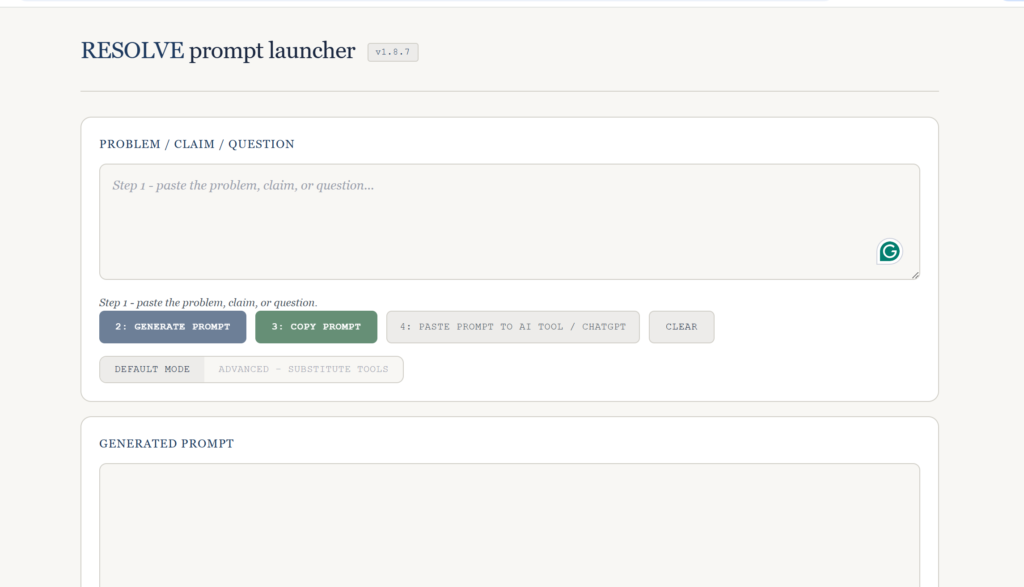
See the launcher before you start
How to use it
- Enter your problem, claim, or question.
- Click Generate prompt.
- Copy the prompt into your AI tool.
- Review the output using the guidance in the RESOLVE Guide.
For better results
RESOLVE works best when the problem is clearly stated and the input is focused. Where helpful, include a few contrasting framings, key constraints, and major uncertainties rather than large amounts of unstructured material.
Want the full method?
The launcher is the quickest way to run RESOLVE with AI. The RESOLVE Guide explains the full method, how to use it without AI, common pitfalls, and how to interpret results.